MongoDB Deep Dive
This is an overview of MongoDB using an “interview-style” approach, that I’ve been using for learning. I’ve found that it is a useful way to think more actively about the subject and test the boundaries of my knowledge.
This questions start with fundamentals (NoSQL, document format) all the way to more advanced distributed database concepts.
MongoDB Fundamentals
Q1.0 - What is MongoDB, and how does it differ from a traditional relational database? must-know
MongoDB is a NoSQL document database. Instead of storing data in rows and columns within fixed-schema tables, it stores flexible JSON-like documents (internally BSON) inside collections.
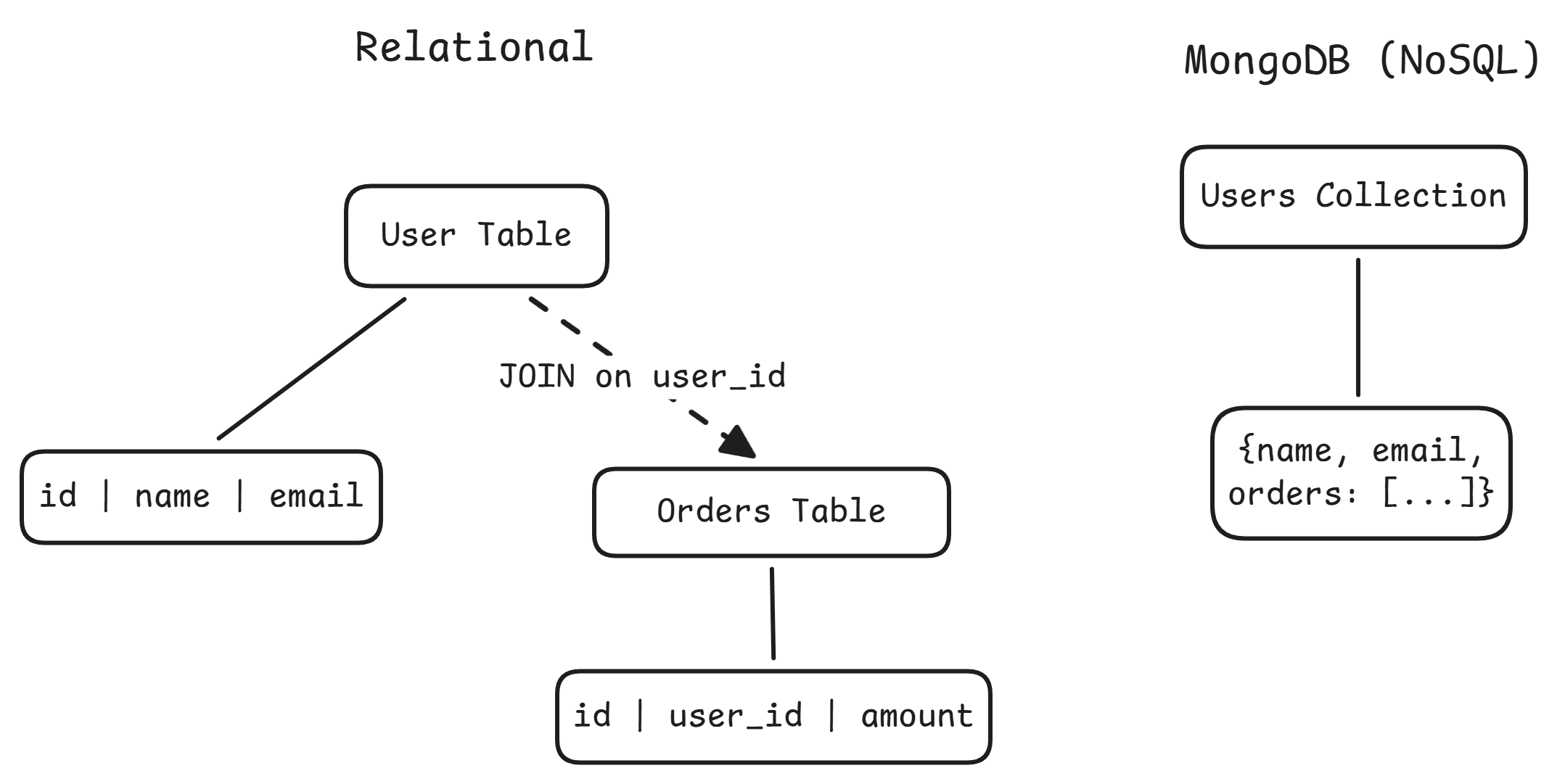
| Dimension | Relational (Postgres/MySQL) | MongoDB |
|---|---|---|
| Schema | Rigid, enforced at write time | Flexible; documents in the same collection can differ |
| Data model | Normalize across tables, JOIN at query time | Embed related data in a single document |
| Query language | SQL | Method/operator API (find, $gt, $match) |
| Scaling | Vertical by default; sharding via external tools | Built-in horizontal sharding |
| Transactions | Mature multi-row ACID | Multi-document ACID since v4.0, but single-doc operations are preferred |
MongoDB shines when data is naturally document-shaped (product catalogs, CMS, user profiles), the schema evolves frequently, you need horizontal write scaling, or reads are document-centric. Relational is the better fit when data has complex many-to-many relationships, you need cross-entity queries with JOINs, or strong transactional integrity is non-negotiable.
One reason MongoDB scales horizontally more easily than Postgres is architecture. Postgres is single-node by default. Replication gives read scaling, but writes go to a single primary and sharding requires external tools like Citus. MongoDB has built-in shard key mechanisms, config servers, and a mongos query router that handles distribution transparently.
MongoDB also fills a different niche than blob storage like S3. S3 is a file store where you put/get objects by key. MongoDB lets you query inside the data, create indexes, run aggregation pipelines, do partial updates, and provides low-latency reads with transactional semantics. The 16 MB document limit rules out large binary objects anyway. Many systems use both: MongoDB for hot, queryable data and S3 for raw archives and large assets.
Q1.1 - What is a document in MongoDB, and what format does it use? must-know
A document is the basic unit of data. It is analogous to a row in a relational table, but far more flexible. Documents are stored in BSON (Binary JSON).
{
  "_id": ObjectId("507f1f77bcf86cd799439011"),
  "name": "Vishal",
  "roles": ["engineer", "mentor"],
  "team": {
    "name": "Strategy",
    "system": "IMC"
  }
}
Values can be strings, numbers, booleans, arrays, nested documents, dates, ObjectIds, binary data, Decimal128, and more.
Documents live inside collections, which are roughly analogous to tables but enforce no schema by default.
Q1.2 - Why does MongoDB use BSON instead of plain JSON? easy
- Richer types:
Date,ObjectId,Decimal128,int32vsint64(none of which plain JSON supports) - Fast traversal: Length-prefixed fields let MongoDB skip to the field it needs without parsing the entire document
- Compact encoding: BSON is more space-efficient than plain text JSON, which is important since MongoDB enforces a 16 MB size limit per document
Q1.3 - What does the _id field do, and what happens if you don’t provide one? must-know
_id is a unique identifier for every document (primary key). No two documents in the same collection can share the same _id. MongoDB automatically creates a unique index on it.
If you don’t provide one, MongoDB generates an ObjectId: a 12-byte value with built-in structure:
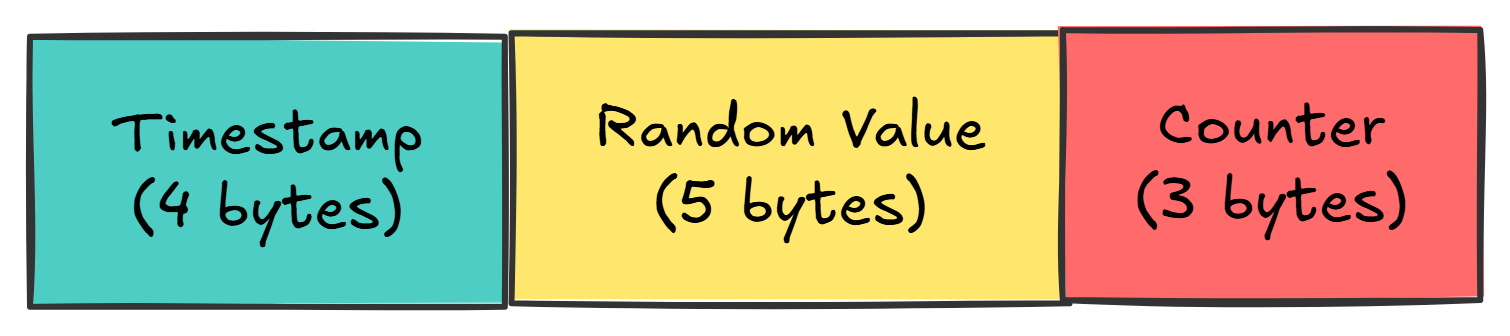
- The timestamp component means ObjectIds are roughly sortable by creation time
- You can extract the creation timestamp with
ObjectId.getTimestamp() - You can provide your own
_id(string, number, etc.), but you’re responsible for uniqueness
MongoDB Operations
Q2.0 - What is the difference between find() and findOne()? easy
-
find()returns a cursor, a lazy iterator that serves documents in batches. You chain.sort(),.limit(),.skip()onto it. -
findOne()returns a single document directly, not a cursor. Effectivelyfind().limit(1). -
findOne()is deterministic, not random. It returns the first match based on natural order or the index being used.
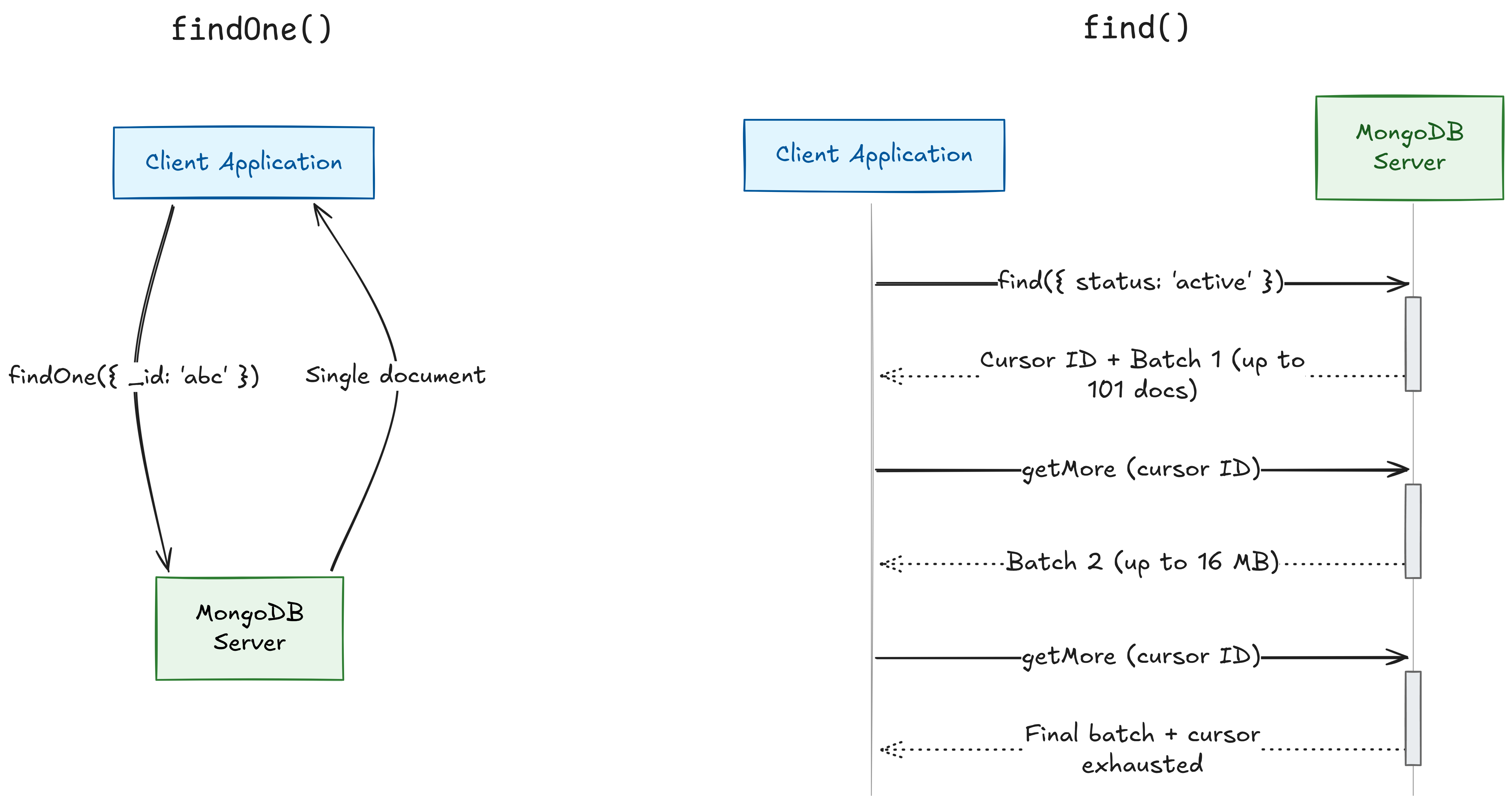
When to use which: findOne() for lookups by _id or a unique field. find() any time you expect or want multiple results.
The cursor returned by find() works on two levels. Server-side, MongoDB holds a reference to the result set, serving 101 documents in the first batch, then 16 MB batches. It has a 10-minute inactivity timeout.
Client-side (Java), the driver returns a FindIterable / MongoCursor. The query doesn’t execute until you start iterating (lazy evaluation). Close the cursor to avoid server-side leaks:
FindIterable<Document> results = collection.find(eq("status", "active"));
try (MongoCursor<Document> cursor = results.iterator()) {
    while (cursor.hasNext()) {
        Document doc = cursor.next();
        // process
    }
}
Q2.1 - What is an aggregation pipeline? Walk through an example. easy
An aggregation pipeline is an array of stages, where each stage transforms data and passes its output to the next, like Unix pipes (cat | grep | sort | uniq).
Example: Total revenue per customer from an orders collection
db.orders.aggregate([
  { $match:  { status: "completed" } },
  { $group:  { _id: "$customerId", totalRevenue: { $sum: "$amount" } } },
  { $sort:   { totalRevenue: -1 } },
  { $limit:  10 }
])
Common Stages
| Stage | SQL Equivalent | Purpose |
|---|---|---|
$match | WHERE | Filter documents |
$group | GROUP BY | Aggregate values |
$sort | ORDER BY | Order results |
$project | SELECT | Reshape / select fields |
$unwind | LATERAL FLATTEN | Flatten arrays into one doc per element |
$lookup | JOIN | Join with another collection |
Performance tip: put $match stages as early as possible to reduce the volume of documents flowing through later stages. MongoDB can use indexes on early $match stages and may merge/reorder stages internally.
Q2.2 - Explain embedding vs. referencing. What factors influence the choice? easy
Embedding: nest related data directly inside the parent document. Larger documents, but a single I/O call to get everything.
// users collection — single document, single read
{
  "_id": ObjectId("64a1..."),
  "name": "Vishal",
  "address": {
    "street": "123 Main",
    "city": "Mumbai"
  },
  "orders": [
    { "item": "Book", "amount": 25 },
    { "item": "Pen",  "amount": 5 }
  ]
}
Referencing: store a reference (like a foreign key) and do a separate lookup. Smaller documents, but an additional round trip.
// users collection
{
  "_id": ObjectId("64a1..."),
  "name": "Vishal",
  "address_id": ObjectId("64b2...")   // references addresses._id
}

// addresses collection — needs a $lookup (join) to fetch from the user
{
  "_id": ObjectId("64b2..."),         // matches user.address_id
  "street": "123 Main",
  "city": "Mumbai"
}
$lookup is MongoDB’s equivalent of a SQL JOIN — it takes the address_id from the user document, finds the matching _id in the addresses collection, and merges the result. It runs server-side inside an aggregation pipeline.
Consider embedding when:
- The relationship is one-to-one or one-to-few (user with address, order with line items)
- The data is always accessed together
- The child data doesn’t make sense on its own
Consider referencing when:
- The relationship is one-to-many or many-to-many with large cardinalities (a user with 10,000 comments would bloat toward the 16 MB limit)
- The child entity is accessed independently
- The referenced data changes frequently (with embedding, you’d update it everywhere; with referencing, update in one place)
Indexing & Query Performance
Q3.0 - How do you create an index, and why would you want to? easy
The syntax for creating an index is as follows:
db.collection.createIndex({ fieldName: 1 })   // ascending
db.collection.createIndex({ fieldName: -1 })  // descending
Without an index, every query does a COLLSCAN, reading every document. $O(n)$. With an index, it’s a B+ tree lookup: $O(\log n)$.
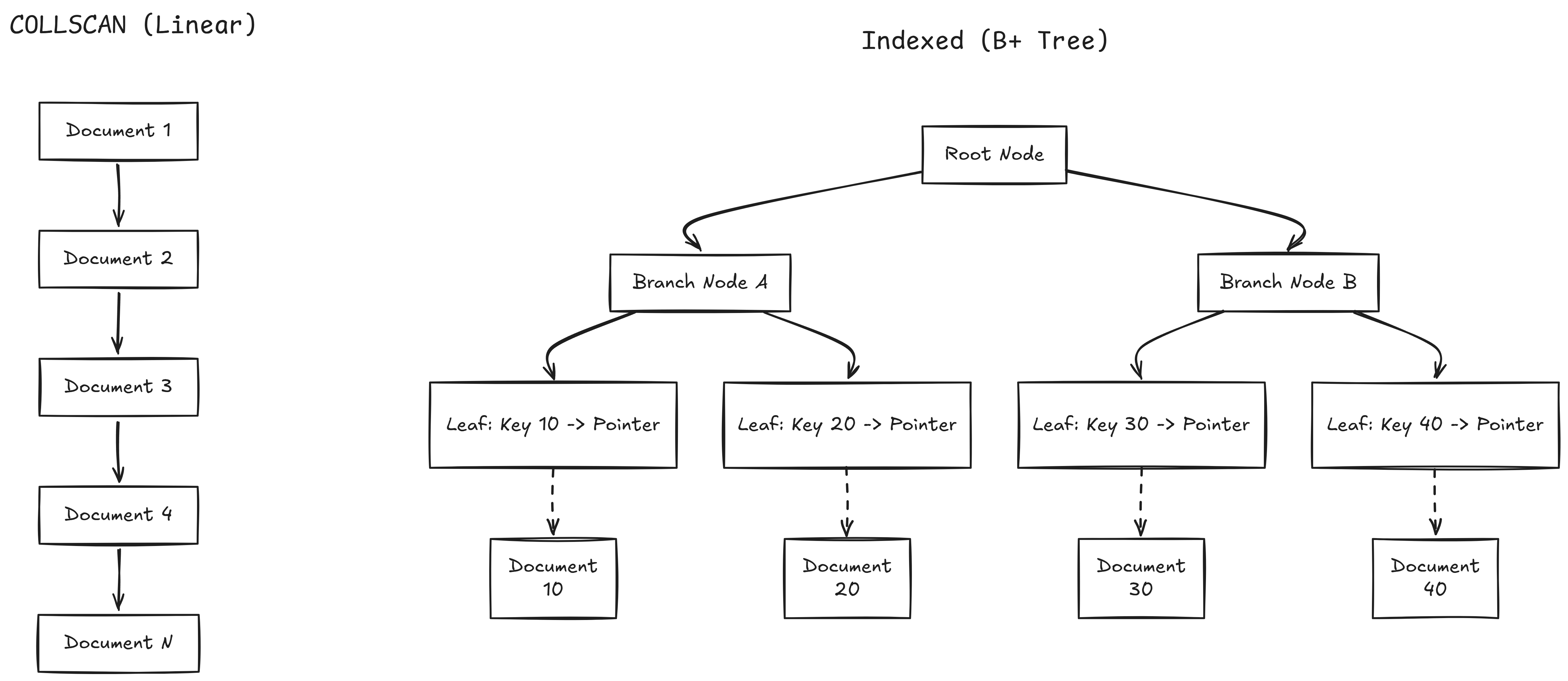
Index Types
| Type | Example | Purpose |
|---|---|---|
| Single field | { age: 1 } | Index on one field |
| Compound | { status: 1, createdAt: -1 } | Multi-field; order matters |
| Unique | { email: 1 }, { unique: true } | Enforces uniqueness |
| Text | { description: "text" } | Full-text search |
| TTL | { createdAt: 1 }, { expireAfterSeconds: 3600 } | Auto-deletes documents after a time period |
Trade-off: Indexes speed up reads but slow down writes (every insert/update/delete must also update the index). They also consume memory. Index based on your actual query patterns.
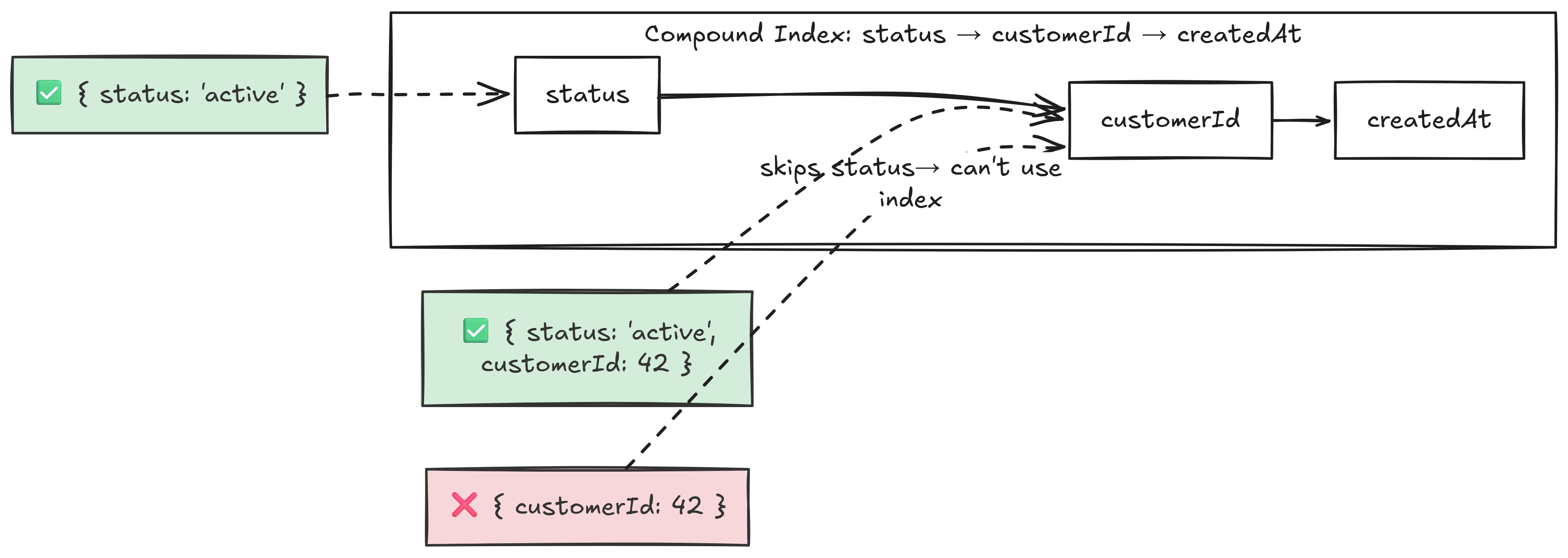
Q3.1 - What is the leftmost prefix rule for compound indexes? easy
For a compound index { status: 1, customerId: 1, createdAt: -1 }, MongoDB can only use it if the query includes fields starting from the left.
Q3.2 - What is index selectivity, and how does the query planner use it? medium
Selectivity = matching documents / total documents. High selectivity (few matches) makes indexes valuable. Low selectivity (e.g., 80% of docs match) may cause the planner to prefer a COLLSCAN.
The query planner races candidate plans on first execution, caches the winner by query shape. The cache invalidates after significant writes, index changes, or server restarts.
Plans are cached based on query shape, not the actual values. If we run a low-selectivity query (status: active matching 80% of docs), the query planner will prefer a COLLSCAN and cache it.
If we run a followup query for a high-selectivitity value (status: suspened matching 0.1% of docs), the query planner will use the cached query shape and use a COLLSCAN read instead of using the index.
Compound indexes improve selectivity: even if no single field is selective, the combination can be. { status: "active", region: "Mumbai" } might narrow 500M docs to 25M (5%) vs 400M (80%) for status alone.
MongoDB also has a hint command to force the query planner to use the index regardless of the cached plan.
Q3.3 - 500M documents, queries are slow, explain() shows COLLSCAN, indexes exist but aren’t used. Diagnose and fix. hard
There are a few categories of potential issues.
Query-Side Problems
- Unindexed fields: the query filters on fields the index doesn’t cover
- Wrong field order in compound indexes. If the index is
{ status: 1, age: 1 }but the query only filters onage, the leftmost prefix rule prevents usage - Index-defeating operators:
$ne,$not,$regexwith leading wildcard. These force a COLLSCAN - Type mismatches: field stored as string but queried as number
Index-Side Problems
- Index corruption: rare, but fixable with
reIndex() - Index not in memory: with 500M documents, the index may be too large for RAM; the planner may decide COLLSCAN is cheaper
Data-Side Problems
- Low selectivity: if an index on
statushas only two values and 80% are"active", the planner decides scanning is cheaper
Diagnostic Tools
-
explain("executionStats"): which plan was chosen, indexes considered and rejected, and why -
$indexStats: usage frequency per index -
mongotop/mongostat: server-level performance - Rejected plans in explain output: alternatives the planner considered
CAP Theorem
Q4.0 - What is the CAP theorem? easy
The CAP theorem states that a distributed data store can only provide two of the following three guarantees simultaneously:
- Consistency: Every read receives the most recent write or an error.
- Availability: Every request receives a non-error response.
- Partition Tolerance: The systems continues to operate despite an arbitrary number of messages being delayed or dropped by the network.
Q4.1 - Is MongoDB partition tolerant? How does its architecture handle network partitions? medium
MongoDB achieves partition tolerance through Replica Sets (also known as single-leader replication).
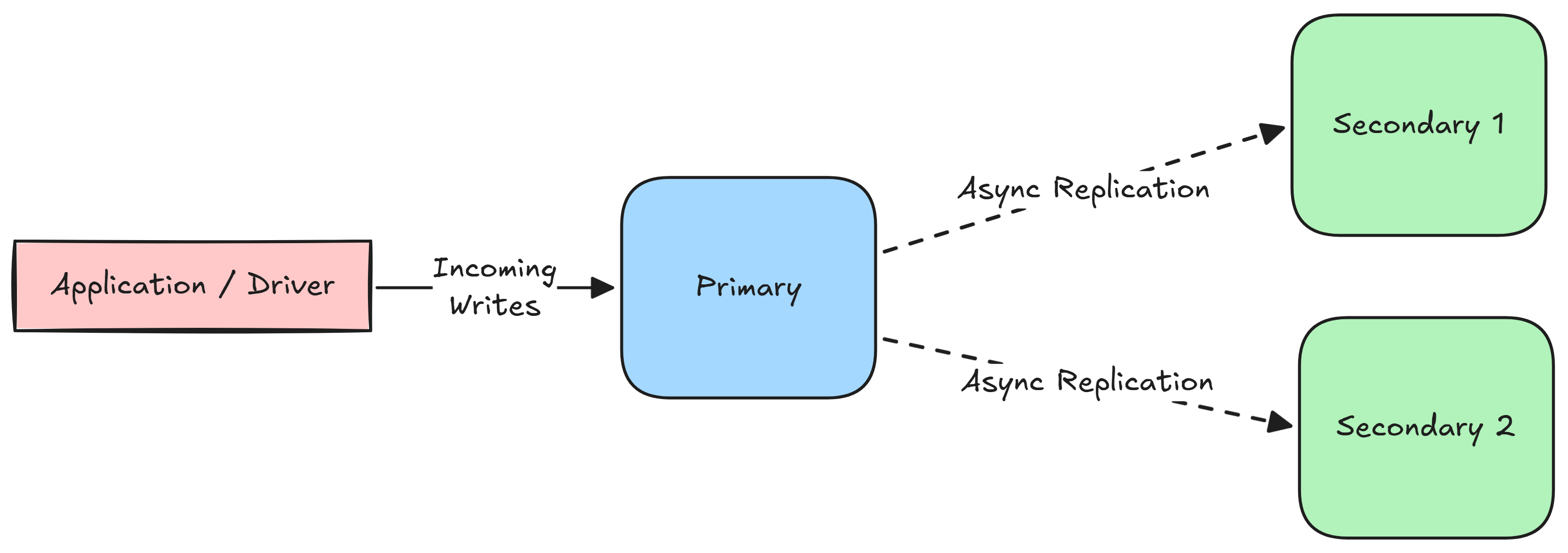
In a single-leader architecture, there is strictly one Primary node. All write operations must be routed through the primary, which records the changes in its operation log (oplog). The secondary nodes read from the oplog asynchronously to update their state.
In order to detect failures, MongoDB uses a heartbeat mechanism. Every node in the replica set pings every other node every 2 seconds. If a node fails to respond within a 10-second timeout, the cluster assumes it is down. If the primary node goes down, the surviving secondary nodes trigger an election for the new primary.
Q4.2 - Why is MongoDB considered CP-leaning? medium
Q4.3 - What are read concerns and write concerns? How do they affect consistency and durability? hard
Transactions
Q5.0 - What are ACID transactions? easy
ACID is an acronym that outlines four properties that guarantee database transactions are processed reliably, even in the event of hardware failures, network issues, or software crashes.
- Atomicity: A transaction is treated as a single, indivisible unit.
- If a transaction consists of multiple steps, all of those steps must complete successfully for the transaction to be saved.
- If a single step fails, the entire transaction is aborted.
- Consistency: A transaction can only bring the database from one valid state to another, based on the configured database invariants (constrainsts, triggers, data integrity).
- Database systems enforce consistency by checking for constraint violations during transactions, cancelling them if necessary.
- Isolation: Concurrent execution of transactrions leaves the database in the same state that would have been obtained if the transactions were executed sequentially.
- Durability: Once a transaction is committed, it will remain in the system regardless of system failures or crashes.
- This is typically acheived by recording all completed transactions in a non-volatile transaction log.